Branded file transfer, on your own domain
When you deliver to your best client, show up like a pro.
Deliver files from your own domain, fully white-labeled. No TrunkTransfer branding. Your client just clicks and downloads.


Trusted by 100+ people and teams who deliver client work on their own domain
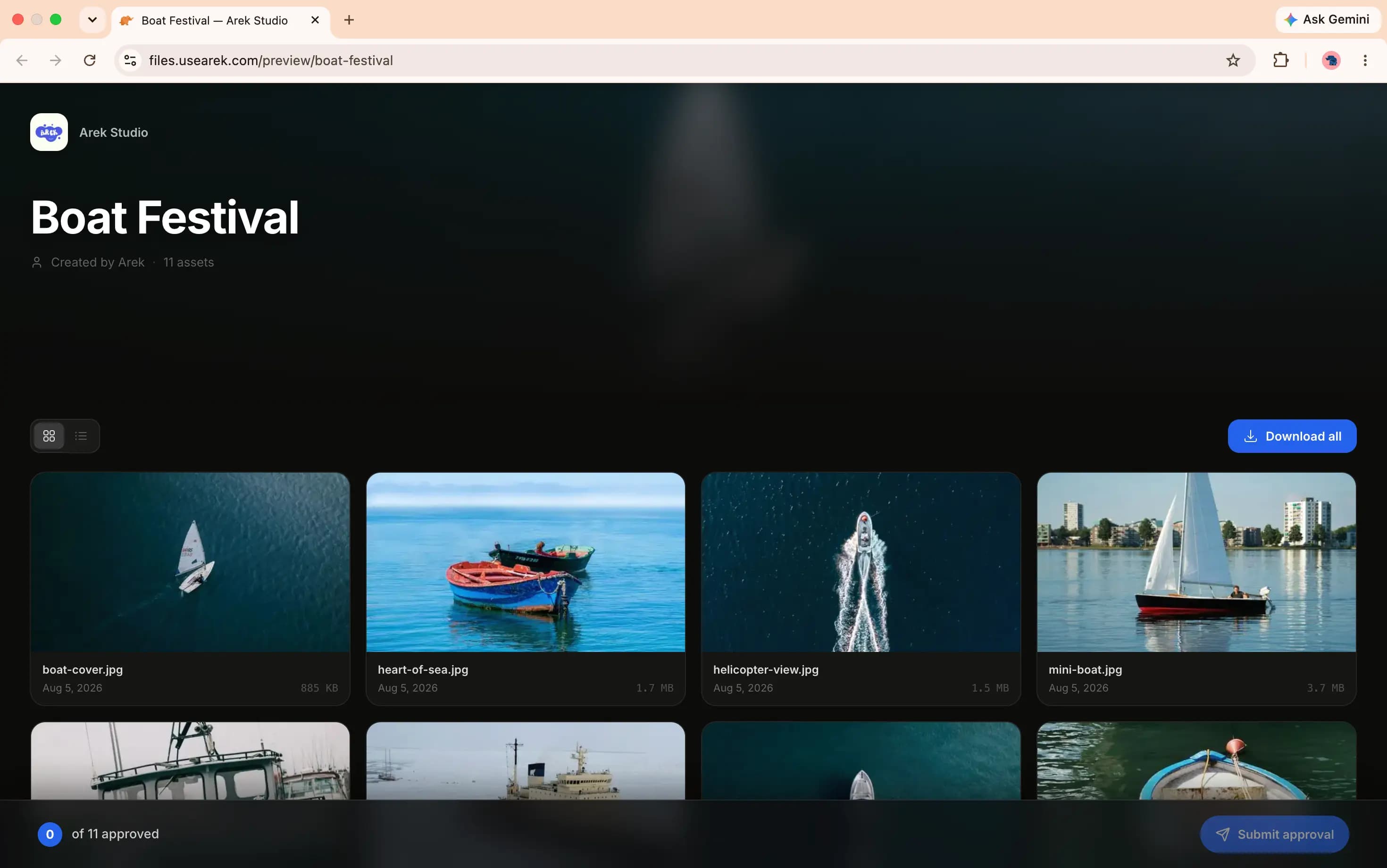
Why creatives don't use generic file-sharing tools
Your project is finished. Now comes the part clients actually see.
Most creatives spend weeks refining the work, then deliver it through a generic Dropbox, Google Drive, or WeTransfer link.
Your client remembers the delivery experience too.
TrunkTransfer gives creatives a professional way to deliver files from their own domain, with their own branding, and no client accounts.
Deliver from files.yourbrand.com
Keep your brand front and center
No client accounts required
Know exactly when files are downloaded
Trusted by teams who deliver client work on their own domain





Fully Whitelabel - Custom domain
Deliver client work under your own brand
under your own brand.
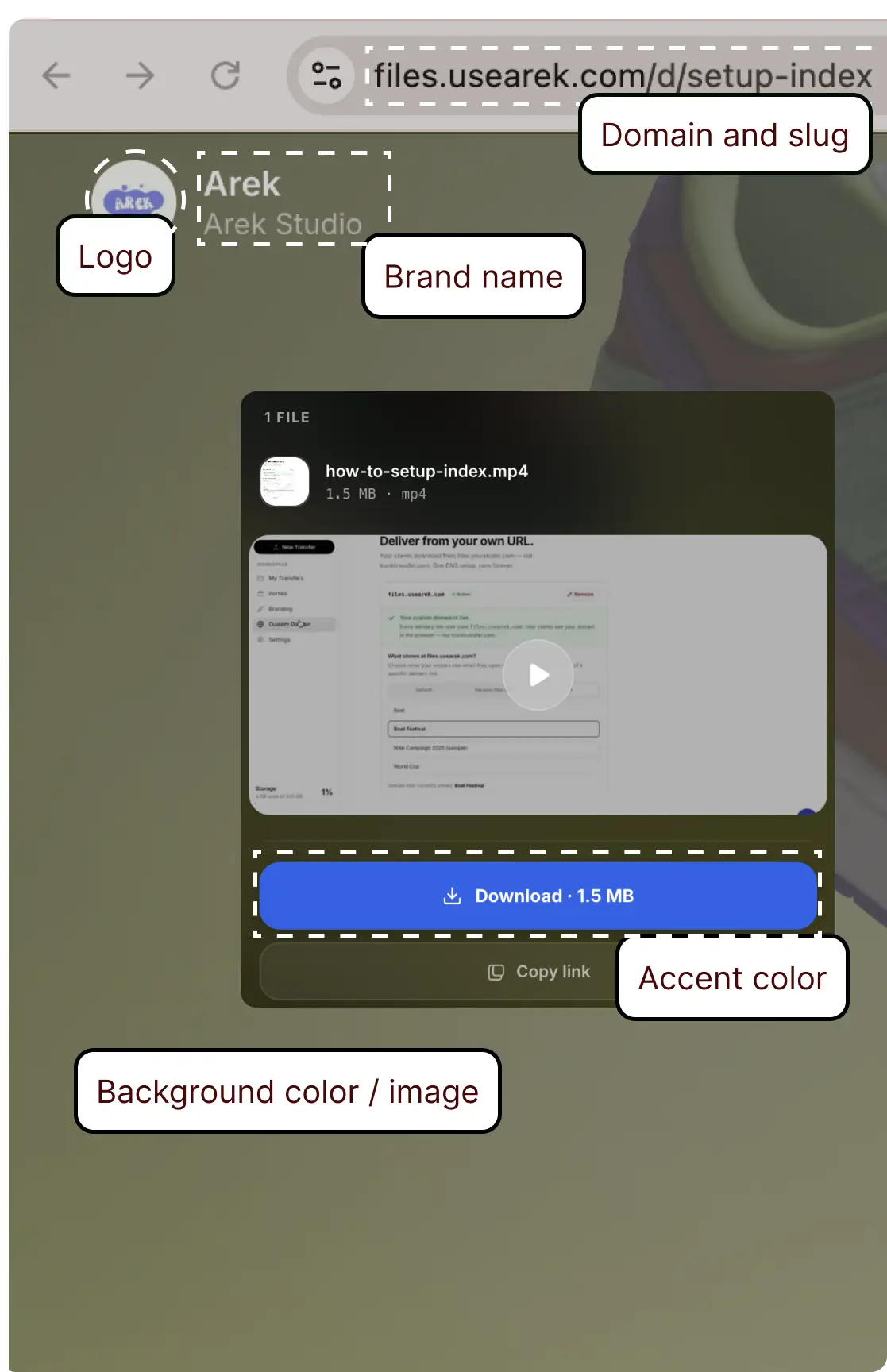
On Starter, connect a subdomain and every delivery link becomes files.yourbrand.com instead of trunktransfer.com. Your client sees your domain in the browser bar, your name on the page, and nothing that says TrunkTransfer. Not in the URL. Not anywhere.
files.yourbrand.com/d/nike-campaign
Your domain in the browser bar
files.yourbrand.com. Not trunktransfer.com. Clients see your address before they even open the file.
Your name on the delivery page
brand name, avatar, and brand colors replace TrunkTransfer entirely. Zero attribution shown to your client.
SSL provisioned automatically
Add a CNAME record at your DNS provider. HTTPS is handled on our end. No extra setup.
Works for portals too
Client portal URLs also use your domain. One consistent branded address across every touchpoint.
White-label delivery
They see your brand. Not ours.
WeTransfer puts their logo on your delivery. Google Drive asks your client to sign in. Dropbox needs an account. Your client thinks the file came from them, not you.
On Starter, the download page shows your brand name, your logo, your background. Client opens the link and sees a professional delivery page. Not a generic file host.
Client portals
Keep every client delivery in one branded place.
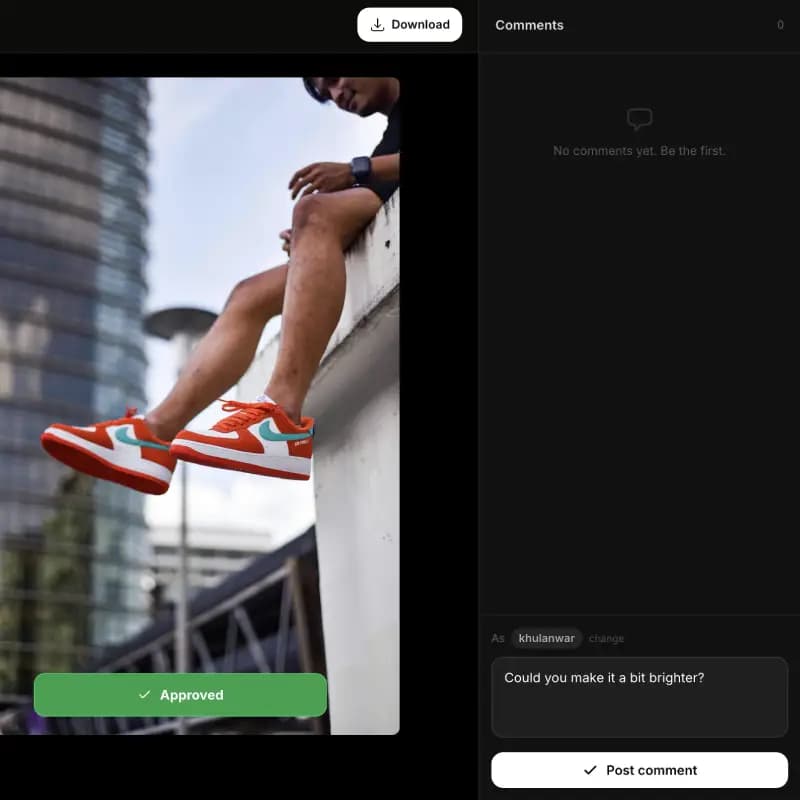
One persistent portal URL per client makes handoffs simple. Upload multiple deliveries, let clients select files for approval, and collect comments without asking them to sign in.
One link per client
Clients open a single branded portal and see every delivery for their project.
Approval selection
Clients can mark approved files and leave feedback on the exact deliverable.
No account required
Review and approval happen with a link only. No passwords, no signups, no client friction.
Your client sees
Raw footage upload
Upload your footage here. No account needed.
Drop files here or click to browse
New files received from client
raw_footage_day1.mp4 · 8.4 GB
Request files
Get raw footage from clients.
No Dropbox. No WeTransfer.
Send your client a link. They upload their raw footage, B-roll, or assets directly to you. No account needed on their end. You get notified when files arrive. Everything lands in your dashboard, ready to download.
One link, that's it
Share a URL. Client opens it, drops files. No signup, no app, no confusion.
Notified when files arrive
Email notification the moment your client uploads. You never have to chase them.
All in your dashboard
Received files appear in a dedicated tab. Download individually or all at once.
Setup
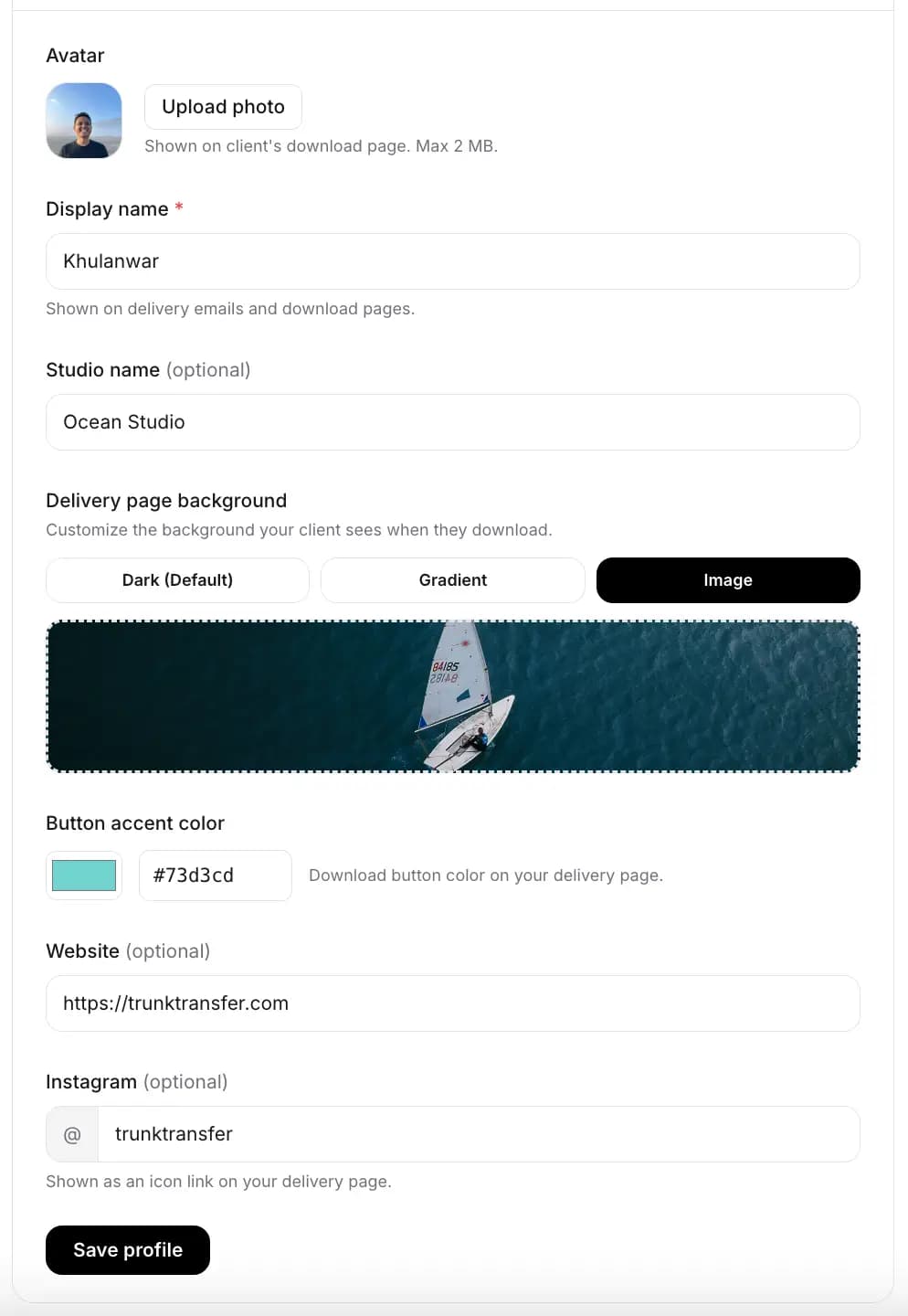
Set it up once. Every delivery looks like yours.
Upload your logo, type your brand name, pick a background. Takes 2 minutes. From that point, every link you send looks like a professional delivery from your brand. Not from a file-sharing app.
Add your brand name and logo
Goes in the header. Client sees it the moment they open the link.
Pick your background
Solid color, gradient, or your own image. Matches your brand.
Send your first delivery
Client opens the link. They see your brand. Not a generic page.
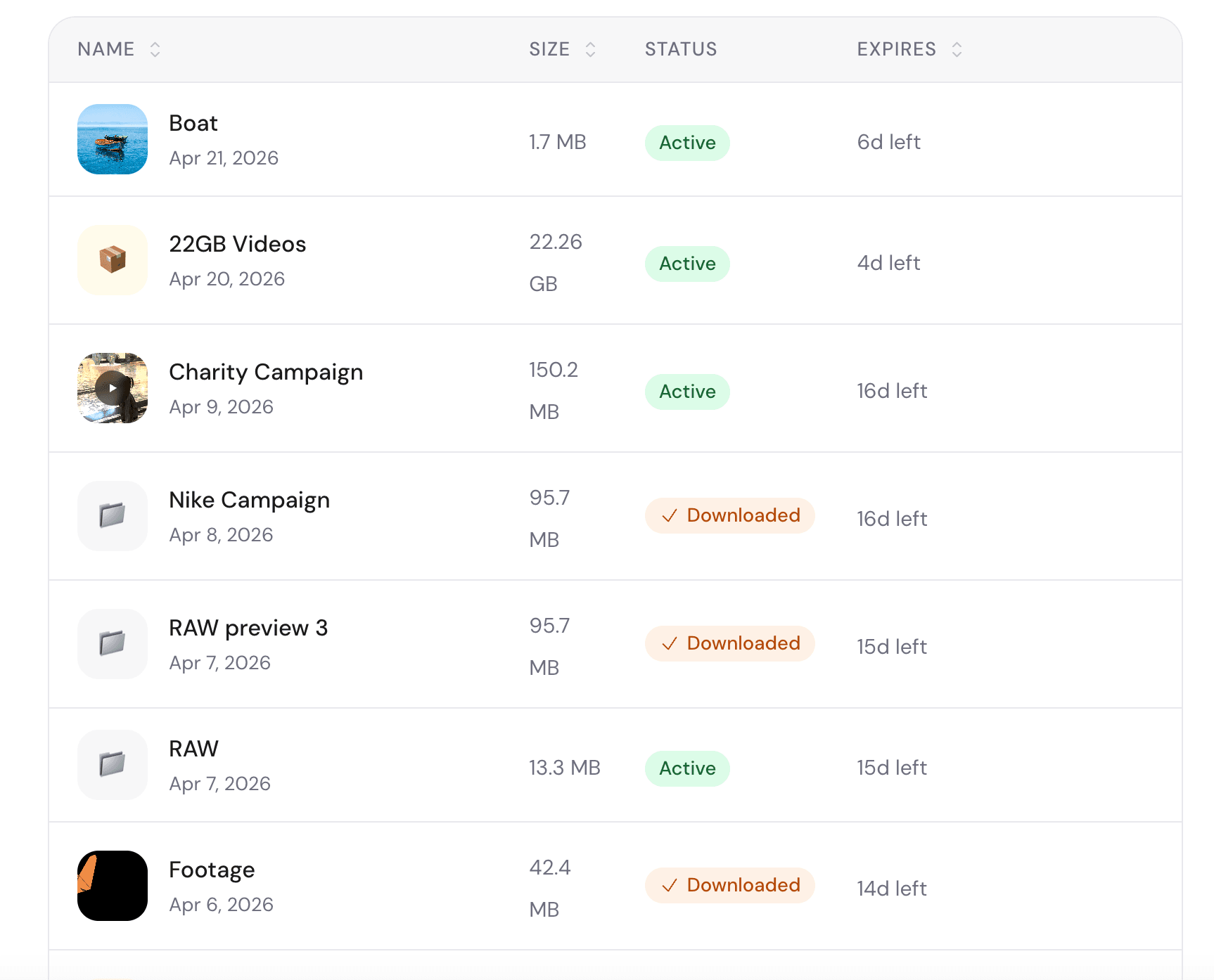
Notifications & dashboard
Know exactly when your client got the file.
Every transfer in one dashboard. Downloaded, expiring, pending. You stop wondering and stop following up. When the notification email arrives, you know the delivery is done.
Everything included
Everything you need to deliver client work professionally.
No client account. Ever.
Your client gets the link, clicks it, download starts. No signup screen, no app, no Google account prompt. Nothing.
Up to 200 GB per transfer
A 15 GB 4K ProRes export goes through as one file. No compression, no splitting, no zipping.
Email when they download
You get an email the moment your client downloads. No more 'did they get it?' follow-up messages.
Password protection
Add a password before you share. Unreleased footage stays between you and the right people.
30-day download window
Links stay live for 30 days. You get a warning email 3 days before expiry. Client has time. You don't re-upload.
No AI training. Ever.
Your brand footage is not training data. Stored privately, deleted after the link expires. Full stop.
Client portals
One link per client. Upload multiple deliveries into a named project. Clients can select files for approval and leave comments on each delivery. Like WeTransfer Portals, but still alive.
Request files from clients
Send a link. Client uploads raw footage to you without creating an account. You get notified when it arrives.
Custom domain
Your link reads files.yourbrand.com instead of trunktransfer.com. Looks professional before they even click.
Transfer dashboard
Every delivery in one place. Downloaded, expiring, pending. You know exactly where each job stands.
Why switch
WeTransfer broke what worked.
Price doubled overnight
Fixed$12/mo to $23/mo after Bending Spoons acquired WeTransfer in 2024. Starter is $9/mo. Same features, less than half the price.
Client asked to sign up
FixedMarketing managers won't create an account just to download your file. With TrunkTransfer: link, click, done. No friction, no dropped deliveries.
AI training on your footage
FixedWeTransfer tried to train AI on uploaded files in July 2025. Your brand footage is not training data. We never will. Files are deleted after expiry.
Portals killed December 2025
AvailableWeTransfer shut down organized per-client workspaces overnight. TrunkTransfer has client portals: one link per client, multiple deliveries inside. No drama.
How it works
Three steps.
Drop your file
MP4, ProRes, ZIP, anything. Up to 200 GB. Goes straight to secure cloud storage. No compression.
Copy your link
One URL. Optionally add a password or a short message. It can be sent automatically via email or you can share it through WhatsApp, Slack, or anywhere you prefer.
Client downloads
They open the link. They see your brand. One click and the file downloads. No account, no app, no friction.
You know it landed
Email the moment they download. You stop following up. Delivery confirmed.
From creative professionals
They were done with WeTransfer too.
Compare plans
Pick the plan that fits how you deliver.
Starter $6/mo Start 7-day trial | Pro $13/mo Upgrade to Pro | |
|---|---|---|
| Transfers | ||
| Delivery link expiry | 30 days | 365 days |
| Account required to send | No | No |
| Password protection | ||
| Download notifications | ||
| Client experience | ||
| No client account required | ||
| Client portalsA dedicated branded workspace per client that collects every delivery you've sent them, one persistent link. No client account required.Learn more in the docs | Up to 5 | Unlimited |
| Review projects (feedback) | ||
| Request files from clients | ||
| Active client storage | 100 GB | 500 GB |
| Branding | ||
| Custom domain deliveryDelivery links use your own domain, like files.yourstudio.com, instead of trunktransfer.com. Set up with one DNS record, no technical background needed.Learn more in the docs | ||
| Branded pages (logo, name, colors)Your logo, name, and colors appear on every delivery page, portal, and file request. No TrunkTransfer branding shown to clients.Learn more in the docs | ||
| Custom emailSend delivery emails, portal shares, and upload confirmations from your own address, like delivery@yourstudio.com, instead of notifications@trunktransfer.com.Learn more in the docs | — | |
| Custom domain's home pageChoose what loads at the bare root of your custom domain, for example files.yourstudio.com with nothing after it: a Request file link or Client Portal, instead of a dead page.Learn more in the docs | — | |
| Custom link slugsReplace the random characters at the end of a link with something readable, like files.yourstudio.com/d/nike-campaign, on transfers, portals, and file requests.Learn more in the docs | — | |
| Team | ||
| CC teammates on deliveries | 1 | Up to 3 |
| Priority support | ||
Why creatives upgrade to Pro
Unlimited portals
Give every client a dedicated branded workspace so handoffs stay organized as your work grows.
Longer client access
Keep review and delivery links live for months so clients can return to files during ongoing campaigns.
More live client work
Keep more active client deliveries in your workspace without constantly cycling projects off the page.
Pricing FAQ
What makes Starter the best plan for creatives?
Starter delivers from your own domain with branded pages, client portals, and a smoother handoff than generic file links.
Can I deliver from my own domain?
Yes. Starter lets you send links that match your brand so clients see your work first.
What is a client portal?
It’s a dedicated branded workspace where a client can find all deliveries for their project.
How long do delivery links stay live?
Starter gives clients 30 days to download and review. Pro keeps links available much longer (365 days).
Do clients need an account to download?
No. Clients open the link and download without signing in.
Do I need a credit card to sign up?
Yes. Every plan starts with a 7-day free trial, and a card is required to activate it. You won't be charged until the trial ends, and you can cancel anytime before then.
Can I get a refund?
Yes. If you're not happy for any reason, email khulanwar@trunktransfer.com and we'll refund you, no questions asked.
Can I customize my delivery link?
Yes, on Pro. Instead of a random string like trunktransfer.com/d/x7j2k9, you can set your own slug, like trunktransfer.com/d/nike-shoes. Available on transfers, client portals, and file request links, and works with a custom domain too.
Still not sure? Start your 7-day free trial. No charge until it ends.
Start your 7-day trial
FAQ
Common questions.
Can I send files from my own domain?
Yes. On Starter, you can connect your own domain so clients receive links like files.yourbrand.com. TrunkTransfer doesn't appear anywhere in the URL. Setup takes a few minutes.
What is white label file delivery?
It means your client sees your brand name, logo, and domain — not ours. No TrunkTransfer branding anywhere on the download page. It looks like your own delivery page.
Is this a WeTransfer alternative with custom domain support?
Yes. TrunkTransfer supports custom domains on Starter. WeTransfer does not offer this at any paid tier. If you want file delivery that shows your domain and your branding, TrunkTransfer is built for that.
Is TrunkTransfer free?
You can send a one-off file with no account at all: up to 3 GB, rate-limited. For ongoing use, custom domain delivery, and client portals, Starter starts with a 7-day free trial. A card is required to activate it, but you won't be charged until the trial ends.
Does my client see TrunkTransfer branding?
No. On Starter, the download page shows your brand name, your logo, and your background. TrunkTransfer doesn't appear anywhere your client can see. It looks like your own delivery page.
Does my client need to create an account?
Never. They get the link, click it, and the file downloads. No signup screen, no app install, no Google account prompt. Works on any browser, any device. That's the whole point.
How large a file can I send?
Up to 3 GB with no account. Up to 200 GB on Starter. A 15 GB 4K ProRes export goes through as one file. No zipping, no splitting, no compression.
Will you train AI on my footage?
No. Files are stored privately and permanently deleted after the link expires. We never use your files for any purpose other than delivery. Brand footage is not training data.
How is this different from Google Drive?
Your client doesn't need a Google account. No 'Request access' screen, no sign-in prompt, no confusion. They click the link and the file downloads. You don't get a support call asking why it didn't work.
Do I need a credit card to sign up?
Yes. Every plan starts with a 7-day free trial, and a card is required to activate it. You won't be charged until the trial ends, and you can cancel anytime before then.
Can I cancel anytime?
Yes. Cancel from your account settings. Your Starter access stays active until the end of the billing period.
Is my payment info secure?
Payments are handled by Polar. We never store your card details.
Can I get a refund?
Yes. If you're not happy for any reason, email khulanwar@trunktransfer.com and we'll refund you, no questions asked.
Your client opens the link. They see your brand.
Start your 7-day free trial. No account required for your client. No charge until the trial ends.