

When a boutique design agency has 3 clients, email works.
When it has 30 clients, email becomes the bottleneck.
Requests get buried.
Feedback gets scattered.
Files end up across Google Drive, Slack, and inboxes.
The result is simple:
The agency spends more time managing communication than creating design work.
Here's a simple workflow many boutique design agencies use to keep projects organized as they grow
The Problem With Email
Imagine a typical website design project.
The client sends a request by email.
A designer replies with questions.
The client sends feedback in another email.
A project manager forwards that feedback internally.
Later, the client asks:
"Can you send me the latest version?"
Now someone is searching through folders and email threads.
The project isn't difficult.
The communication is.
Step 1: Give Clients One Place to Submit Requests
Instead of asking clients to email requests, give them a dedicated client portal.
With ManyRequests, agencies can create services such as:
- Landing Page Design
- Website Updates
- Brand Identity
- Social Media Design
Clients submit requests through structured forms instead of open-ended emails.
This helps agencies collect the information they need before work starts.
For example, a website update request might include:
- Page URL
- Request description
- Deadline
- Supporting files
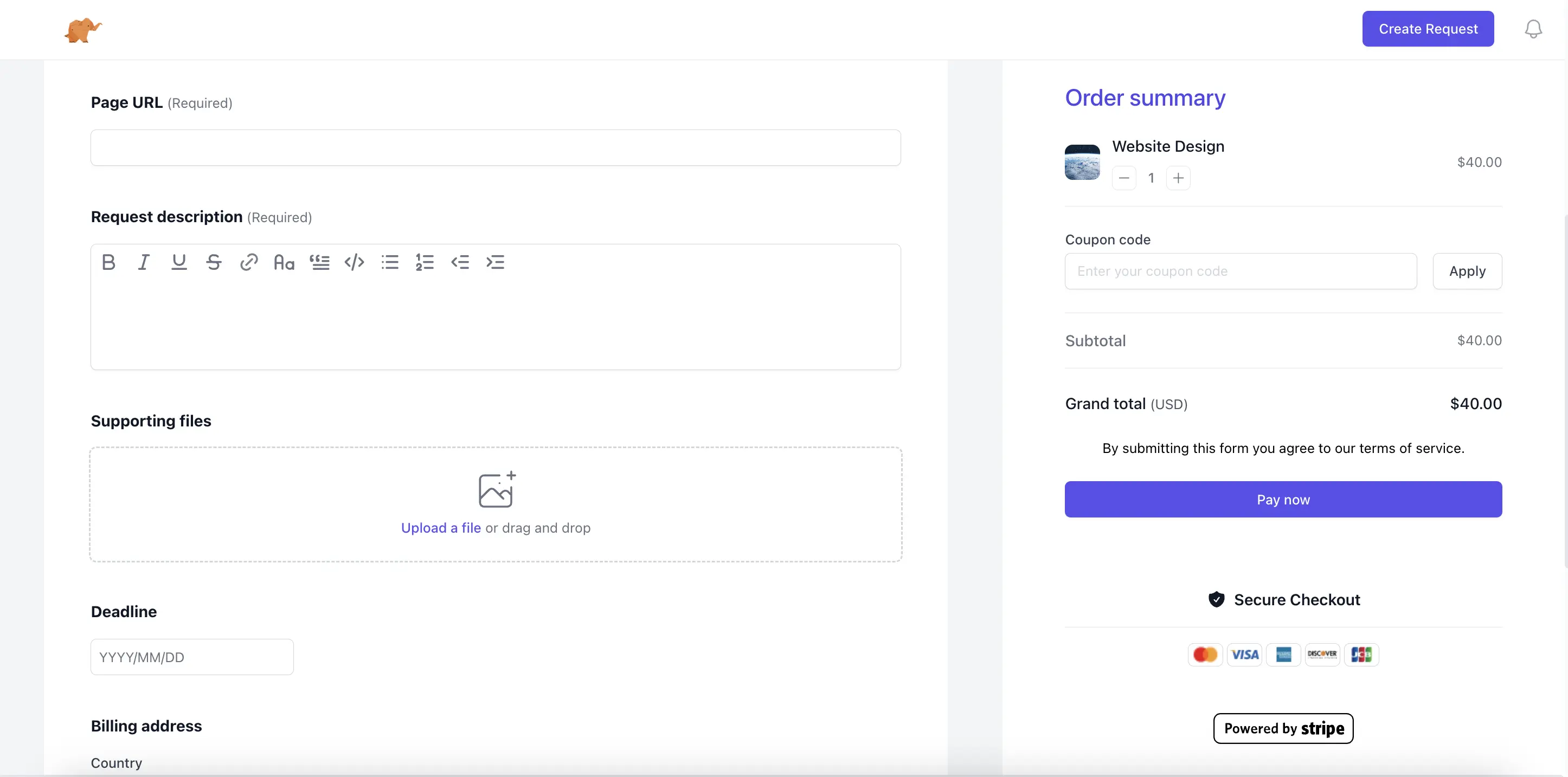
The agency gets better briefs.
The client gets a smoother experience.
Step 2: Keep Every Conversation Attached to the Request
One common mistake is spreading communication across multiple channels.
- Slack
- Loom
- Google Docs
As projects grow, finding context becomes difficult.
A better approach is keeping discussion attached to the original request.
The designer can see:
- Original brief
- Client comments
- Attached files
- Revision history
without switching between tools.
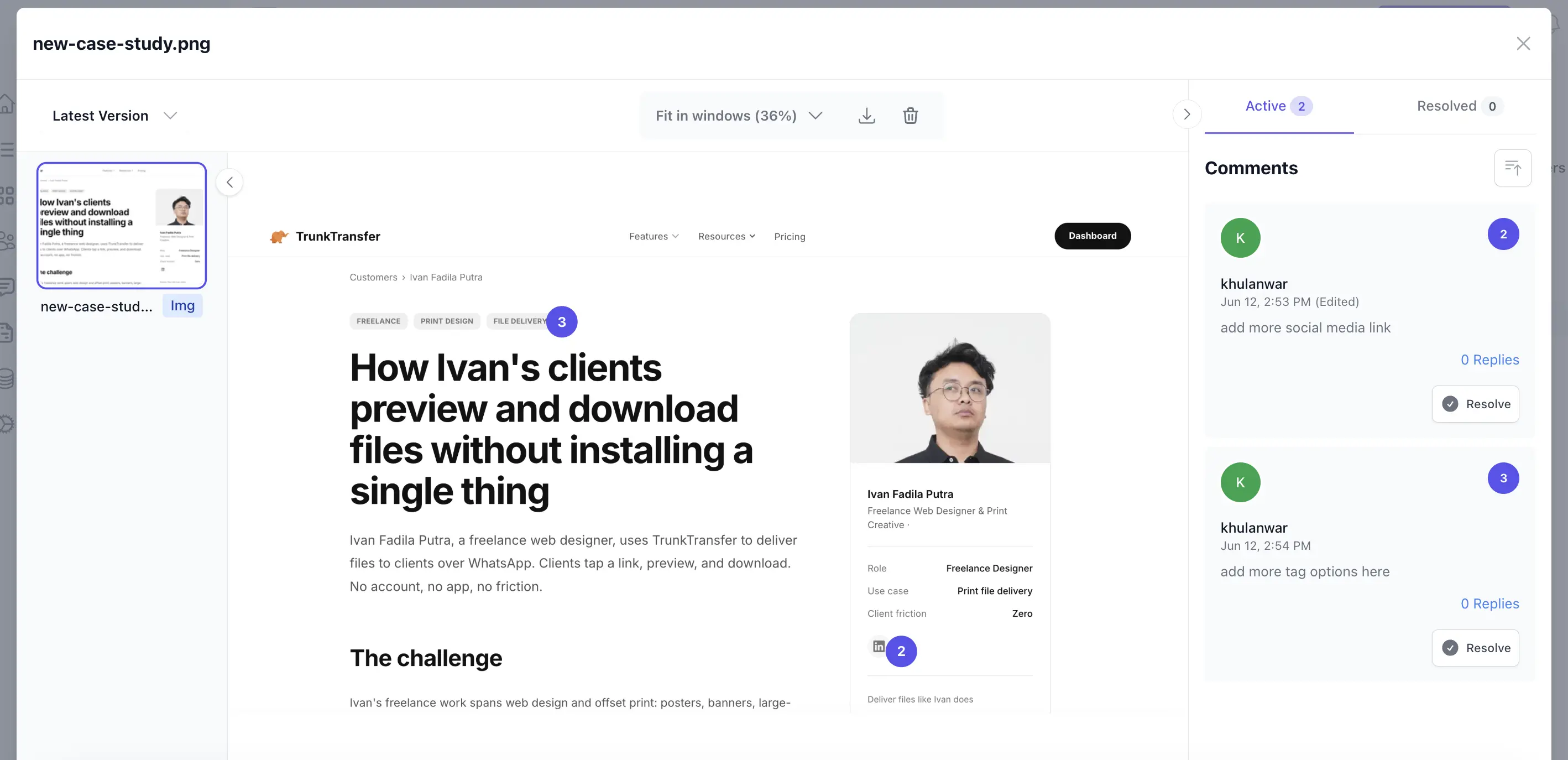
The client always knows where to leave feedback. The team always knows where to find it.
Instead of asking clients to send feedback by email, keep all communication inside the request.
The request becomes the single source of truth for the project.
Designers can review the original brief, comments, attached files, and revision history without switching between tools.
This becomes especially valuable when a project returns weeks or months later.
Step 3: Make Project Status Visible
Clients don't actually want updates.
They want certainty.
Most status emails are simply asking:
"What's happening?"
A client portal solves this by making project status visible.
A typical workflow might be:
- Submitted
- In Progress
- Internal Review
- Awaiting Approval
- Approved
These statuses create clear expectations for both the agency and the client. Instead of asking for updates, clients can see exactly where their request stands.
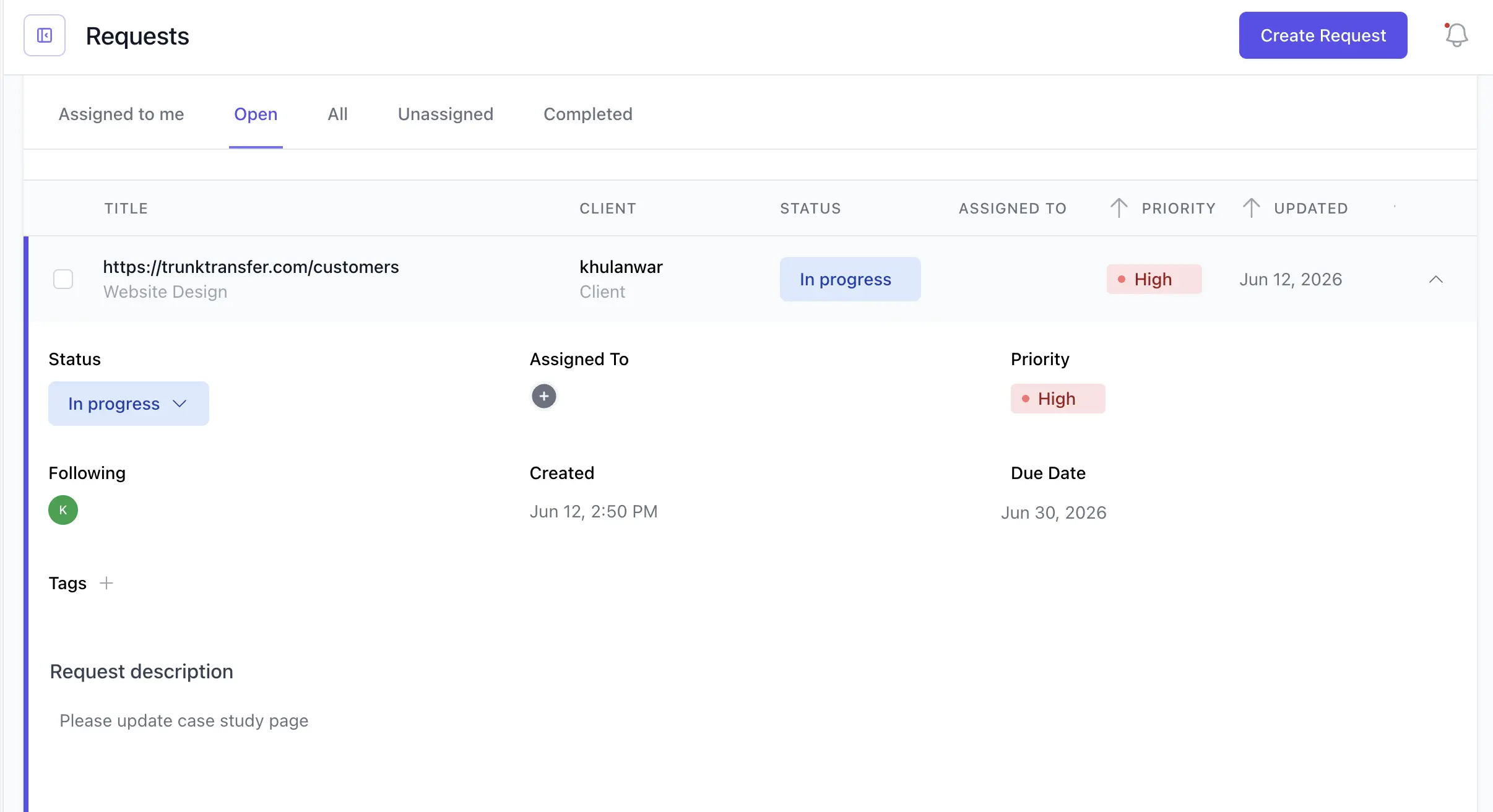
Clients can see progress without sending follow-up emails.
The agency receives fewer interruptions.
Step 4: Create a Clear Approval Stage
Many boutique agencies struggle with endless revisions.
Not because clients are difficult.
Because there is no formal approval process.
Without approval, projects never truly finish.
A better workflow is:
- Internal Review → The agency checks quality internally.
- Awaiting Approval → The client reviews the work.
- Approved → The project moves to delivery.
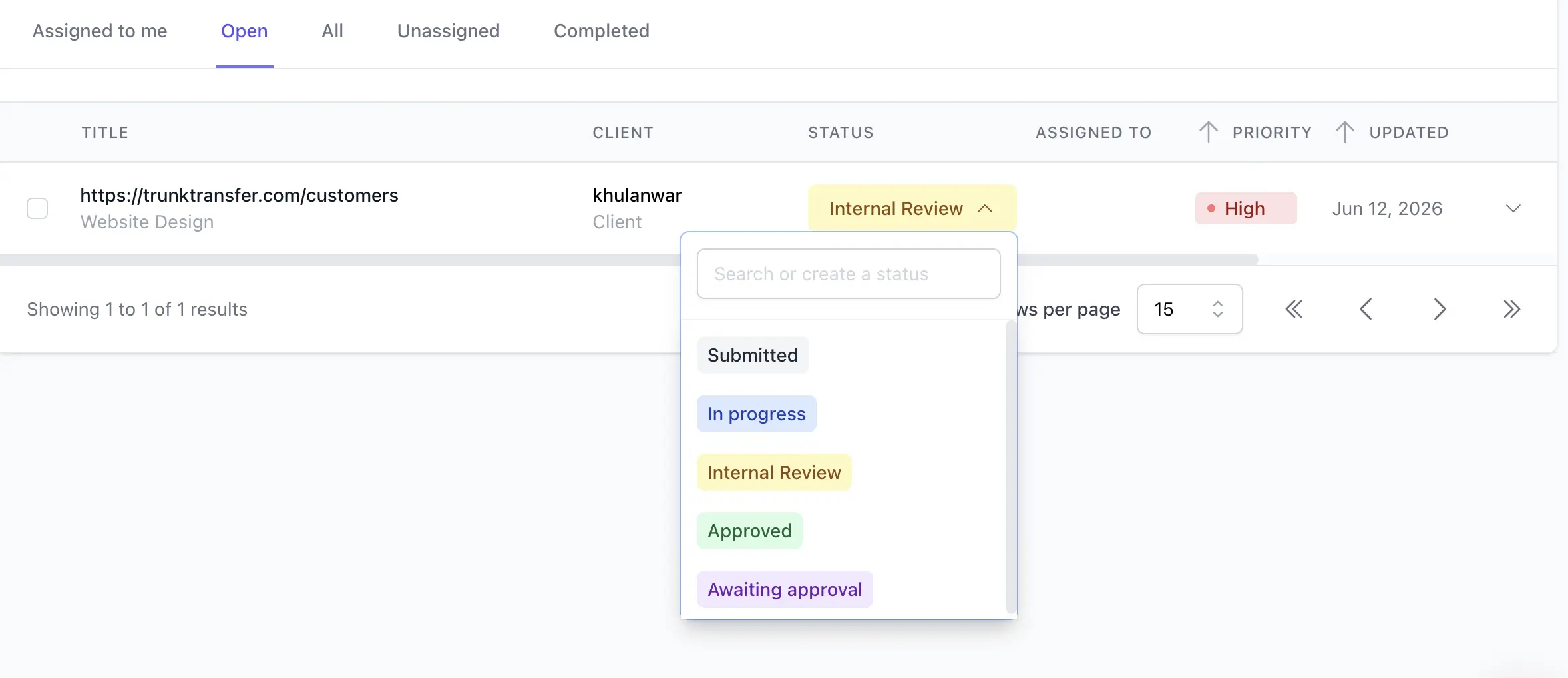
This creates a clear handoff point.
Everyone knows the work is complete.
Step 5: Deliver Final Files Professionally
After approval, the final assets need to be delivered.
This is often where the process falls apart.
An agency might spend weeks creating a polished client experience only to send the final files through a generic transfer link.
The delivery experience is still part of the client experience.
Many boutique agencies prefer to deliver files from their own domain so the experience stays consistent from start to finish.
For example:
- portal.youragency.com for requests and communication
- files.youragency.com for final delivery
Tools like TrunkTransfer make this possible without requiring clients to create another account.
The agency remains front and center throughout the entire project lifecycle
A Simple Workflow for Boutique Design Agencies
| Stage | Recommended Tool |
|---|---|
| Client Requests | ManyRequests |
| Client Communication | ManyRequests |
| Project Tracking | ManyRequests |
| Client Approval | ManyRequests |
| Final File Delivery | TrunkTransfer |
The goal isn't to add more software.
The goal is to remove friction for your client.
When requests, feedback, approvals, and delivery happen in a predictable workflow, agencies spend less time managing projects and more time doing the work clients actually hire them for.
Frequently Asked Questions
Can a boutique design agency stop using email completely?
Probably not. Email is still useful for introductions, contracts, invoices, and important announcements. The goal is to stop using it as the main place for project requests, feedback, approvals, and file delivery. Keeping those activities inside a structured workflow makes project history easier to find and reduces missed details.
How do I get clients to use a client portal instead of emailing requests?
Set the expectation during onboarding and make the portal the easiest way to get work started. Give clients one clear link, explain what information to include, and respond to new requests inside the portal. If a client emails a request, move it into the portal and send them the link so the process becomes familiar.
What should a boutique design agency look for in a client portal?
Look for structured request forms, file attachments, request-level conversations, visible project statuses, approval steps, and a simple client experience. The portal should reduce administrative work for the agency without making clients learn a complicated project management system.
How can agencies prevent endless design revisions?
Define the number of revision rounds in the project scope, collect feedback in one place, and require a clear approval step before final delivery. Consolidated feedback helps designers act on one agreed direction instead of responding to conflicting comments across email, Slack, and documents.
Should project files and final deliverables use the same tool?
Not necessarily. A client portal is useful for active requests, feedback, and approvals. A dedicated file delivery tool is often better for sending final, approved assets in a polished and easy-to-download format. Using separate tools for these stages can create a clearer boundary between work in progress and completed work.
Why use a custom domain for final file delivery?
A custom delivery domain keeps the agency's brand visible at the final client touchpoint. It also gives clients a recognizable place to download approved files without creating another account or receiving a generic third-party transfer page.


