

The difference between branded and regular file transfer is whose brand the client sees when they receive your files. Regular file transfer (WeTransfer, Dropbox, Google Drive) sends files through the vendor's pages, on the vendor's domain, with the vendor's logo, so the client sees the file host, not you. Branded file transfer puts the entire experience on your own domain (files.yourbrand.com) with your logo and colors, so the client sees your business and no vendor name at all. For personal sends the difference doesn't matter; for paid client work, it changes the impression at the exact moment work is delivered.
The Core Difference: Who the Experience Is For
Regular and branded file transfer both move files from you to a recipient. The difference is who the experience is built around.
Regular file transfer is built for the sender and the vendor. The tool optimizes for how fast you can upload and send. The recipient's experience is an afterthought: a generic page, the vendor's branding, sometimes ads, sometimes an account requirement. Crucially, the vendor's brand on every download page is free marketing for them, so keeping it there is in their interest, not yours.
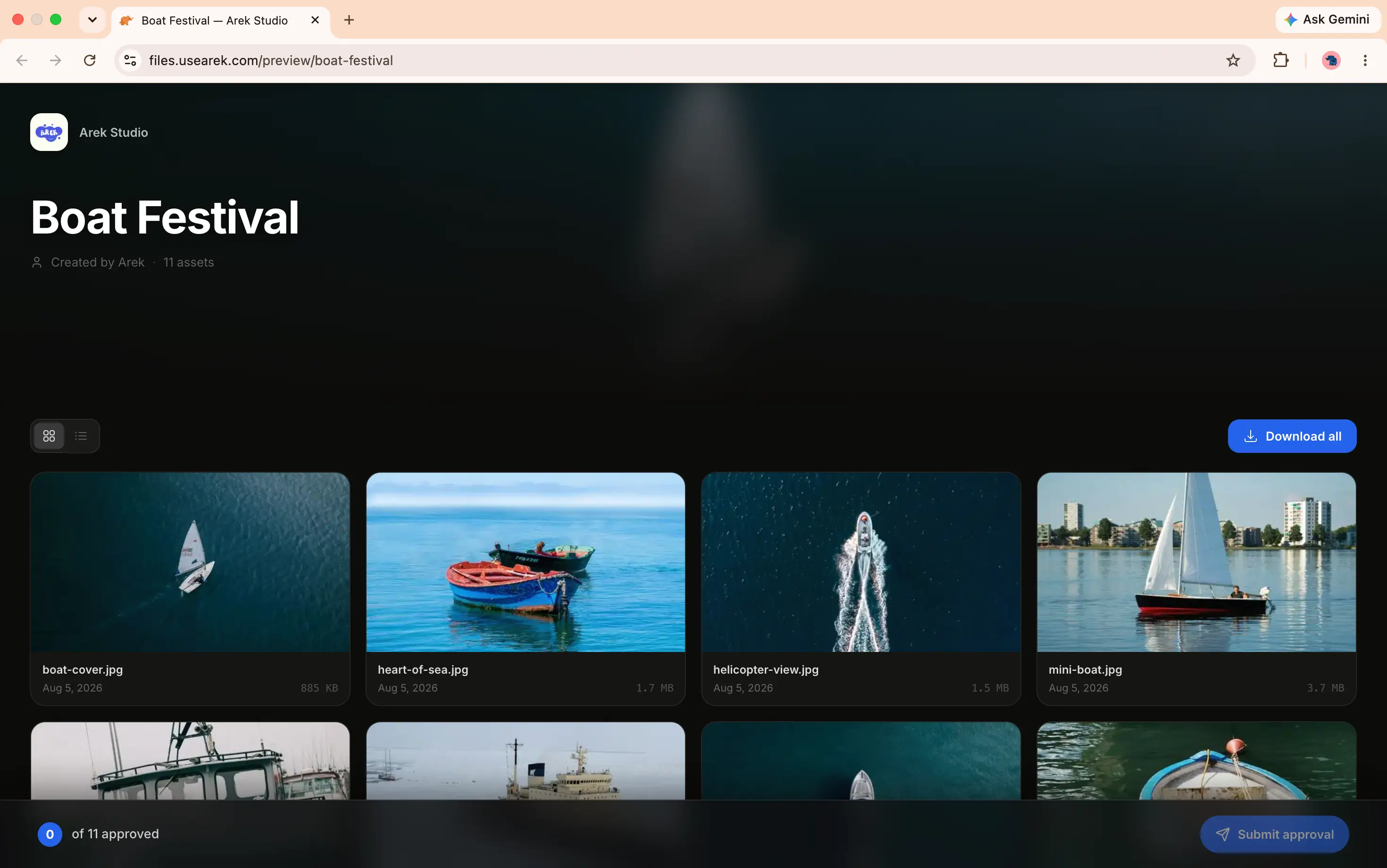
Branded file transfer is built for the recipient. The premise is that the file page is a client touchpoint, like your proposal or invoice. So the experience is designed around what the client sees: your domain, your logo, no ads, no account, no vendor name. The whole point is that the delivery looks like it came from you.
Everything else about the two follows from this one difference in design intent.
Side by Side
| Regular file transfer | Branded file transfer | |
|---|---|---|
| Domain on the link | Vendor's (we.tl, dropbox.com) | Yours (files.yourbrand.com) |
| Branding on the page | Vendor's logo and colors | Your logo and colors |
| Ads | Sometimes (free tiers) | Never |
| Client account | Sometimes required | Never required |
| Download notifications | Rare | Standard |
| Persistent client space | No | Client portals |
| Upload/request page | Vendor-branded | Your-branded |
| Designed for | The sender and vendor | The client receiving |
| Typical cost | Free to $23/mo | From $9/mo |
| Best for | Personal, one-off sends | Paid client work |
What "Regular" File Transfer Looks Like in Practice
You upload a file to WeTransfer, Dropbox, or Google Drive, and send the link. The recipient clicks it and lands on:
- A page at
we.tl,dropbox.com, ordrive.google.com - The vendor's logo and colors
- On free WeTransfer, an advertisement
- Sometimes a prompt to create an account (Google Drive, depending on sharing settings)
It works, and it's fast. For sending holiday photos to family or a file to a friend, it's completely fine. The recipient doesn't care whose brand is on the page, and neither should you.
What "Branded" File Transfer Looks Like in Practice
You upload the same file to a branded tool with your custom domain connected. The client clicks the link and lands on:
- A page at
files.yourbrand.com, your domain - Your logo and colors
- No ads, no vendor name, nowhere
- No account required, they click and download
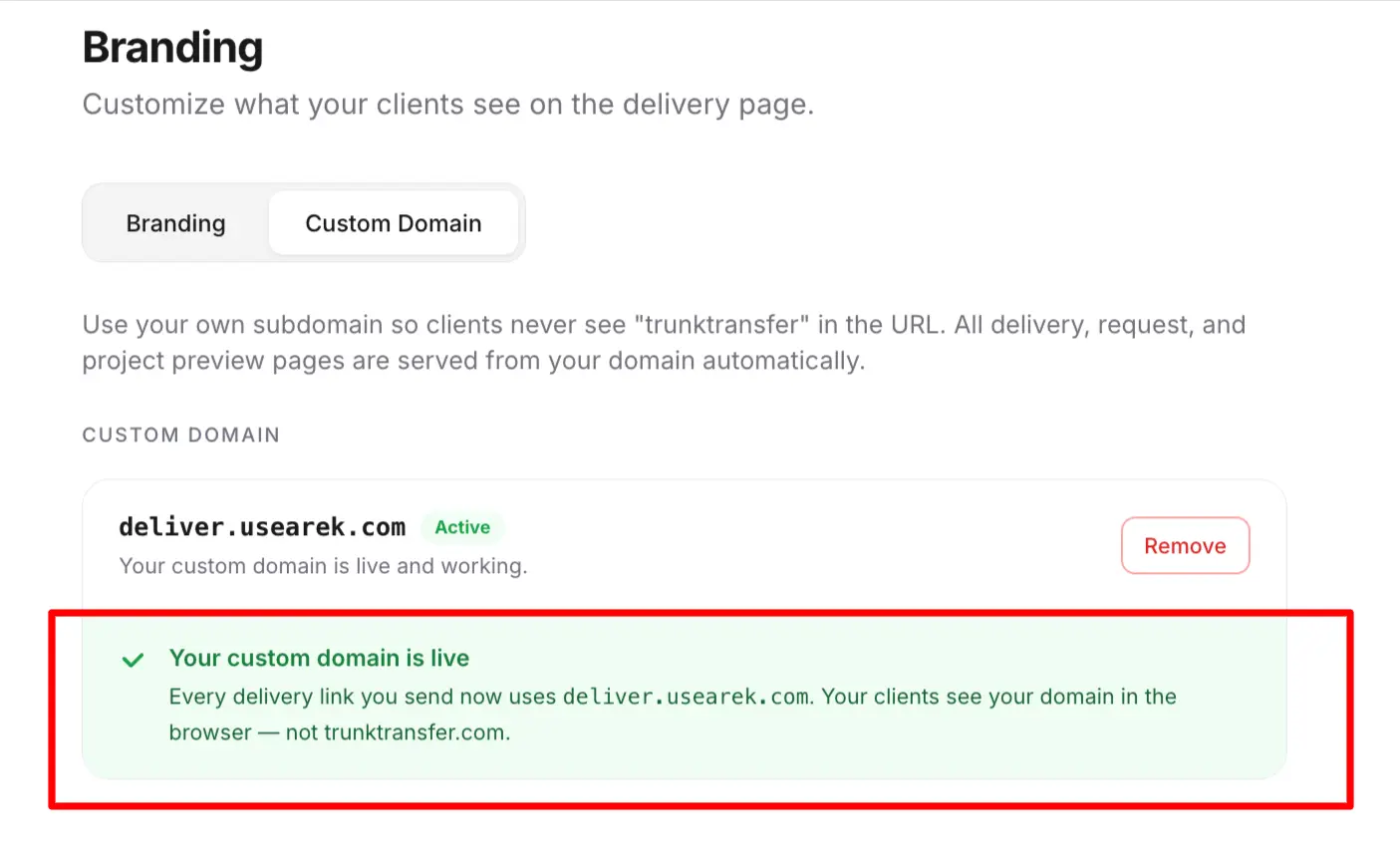
To the client, the delivery looks like your business built and hosts it. There's no third-party file host in the experience at all. The mechanics of how this works, one DNS record and an automatic certificate, are covered in what is branded file transfer.
Which Tools Actually Offer Branded File Transfer
"Branded" gets used loosely in this market. Most tools that advertise it only put your logo on a page that still lives on the vendor's domain, a branded subdomain, not a true custom domain. The test that matters: does the client's link contain your domain, or the vendor's?
| Tool | True custom domain? | Plan required | Price |
|---|---|---|---|
| TrunkTransfer | Yes | Starter | $9/mo |
| TransferNow | Yes | Enterprise only | Custom pricing |
| Smash | Yes | Enterprise only | Custom pricing |
| Files.com | Yes | Power and up | From ~$499/mo |
| WeTransfer | No (logo only, on we.tl) | Ultimate | $23/mo |
| Dropbox Transfer | No | Not on any plan | N/A |
| Google Drive | No | Not on any plan | N/A |
| MASV | No (upload side only) | Not on any plan | N/A |
| Hightail | No | Not on any plan | N/A |
Of these, only three offer a true custom domain at all, and two of those gate it behind enterprise sales calls or a ~$499/mo platform built for compliance and SFTP automation, not client delivery. TrunkTransfer is the one tool here that includes a real custom domain, files.yourbrand.com, at a standard self-serve price. The full breakdown of what each tool actually gates is in branded file transfer without enterprise pricing.
When Regular File Transfer Is the Right Choice
Branded transfer isn't always necessary, and it's worth being honest about that. Regular file transfer is the right call when:
- The send is personal. Photos to family, a file to a friend, anything where no professional reputation is attached.
- It's a one-off with someone who doesn't matter to your brand. A quick file to a contractor you'll never work with again.
- You genuinely don't mind the vendor's brand on the page. If the recipient's impression of your business isn't in play, regular transfer is simpler and often free.
For these, paying for branded transfer would be over-engineering a non-problem.
When Branded File Transfer Is Worth It
Branded transfer earns its place the moment the recipient is a client and the files are paid work:
- Final client deliverables. The download page is the last thing the client sees; it should look like you.
- Ongoing client relationships. A client portal on your domain gives repeat clients one branded place for everything.
- Collecting files from clients. A branded upload page makes the first interaction of a project look professional too.
- Any work where reputation is on the line. If a client landing on a WeTransfer page (possibly with an ad) would undercut your positioning, branded transfer solves it.
The cost of branded transfer, from $9/mo, is low enough that for anyone delivering paid work regularly, the question is usually why not rather than why.
Why the Difference Is Bigger Than It Looks
At a glance, "the vendor's logo vs my logo" sounds cosmetic. It isn't, for two reasons.
The download page is disproportionately visible. A project might involve weeks of work the client never sees, then one link they absolutely do. That single page carries an outsized share of the impression, and if it's branded by a free file host, it quietly reframes the whole project as something run on consumer tools.
Regular transfer often can't be fixed by paying. People assume a paid plan removes the vendor's brand. Usually it doesn't. WeTransfer's paid Ultimate plan adds your logo but keeps its own domain in the URL. To actually remove the vendor entirely, you need a custom domain, which regular file transfer tools don't offer at all. That's the real dividing line: not free vs paid, but vendor's domain vs your domain.
Frequently Asked Questions
What is the difference between branded and regular file transfer?
Regular file transfer sends files through the vendor's pages, on the vendor's domain, with the vendor's branding. Branded file transfer puts the entire experience on your own domain (files.yourbrand.com) with your logo and colors, so the client sees your business and no vendor name.
Is branded file transfer worth it for a small business?
If you deliver paid work to clients, yes. The download page is a brand touchpoint the client sees at the end of every project, and branded transfer costs from $9/mo. For purely personal file sending, regular file transfer is fine and often free.
Can't I just pay for a WeTransfer plan to remove the branding?
Not entirely. WeTransfer's paid Ultimate plan adds your logo to a page still hosted on WeTransfer's domain. It never removes WeTransfer's domain from the link. To remove the vendor completely, you need a tool with a true custom domain, which WeTransfer doesn't offer on any plan.
Is regular file transfer ever the better choice?
Yes, for personal, one-off sends where no professional reputation is attached, holiday photos, a file to a friend, a quick send to a one-time contractor. In those cases, regular file transfer is simpler and usually free, and branded transfer would be unnecessary.
How much more does branded file transfer cost than regular?
Less than you'd think. Regular file transfer ranges from free to about $23/mo (WeTransfer Ultimate). Branded file transfer with a true custom domain starts at $9/mo on TrunkTransfer, which is often cheaper than the paid regular-transfer plans that still don't give you your own domain.
Does branded file transfer work for receiving files too?
Yes. Branded file transfer covers both directions: sending deliverables and collecting files from clients. A branded upload page means the client sends you files on your domain as well, so the whole exchange stays on your brand.
The Bottom Line
Regular file transfer serves the sender and markets the vendor. Branded file transfer serves the client and markets you. For personal sends, regular is fine. For paid client work, the download page is a brand touchpoint, and the difference between the vendor's domain and your domain is the difference between "this business uses a free tool" and "this business has a system."
The dividing line isn't free vs paid. It's whose domain the client sees. And getting your own domain on the link starts at $9/mo.


