

Branded file transfer is the practice of sending and receiving files through web pages that carry your own domain, logo, and colors, instead of a generic file-sharing service that shows its branding to your client. When a client clicks a link like files.yourbrand.com and lands on a page that looks like your business built it, that is branded file transfer. When they click a wetransfer.com or dropbox.com link and land on someone else's page, that is standard file sharing with your work inside it.
This is a complete reference: what branded file transfer is, how it works technically, the difference between real and partial branding, what every major tool actually costs, a buyer's checklist, the mistakes to avoid, and how to set it up.
1. What Branded File Transfer Actually Includes
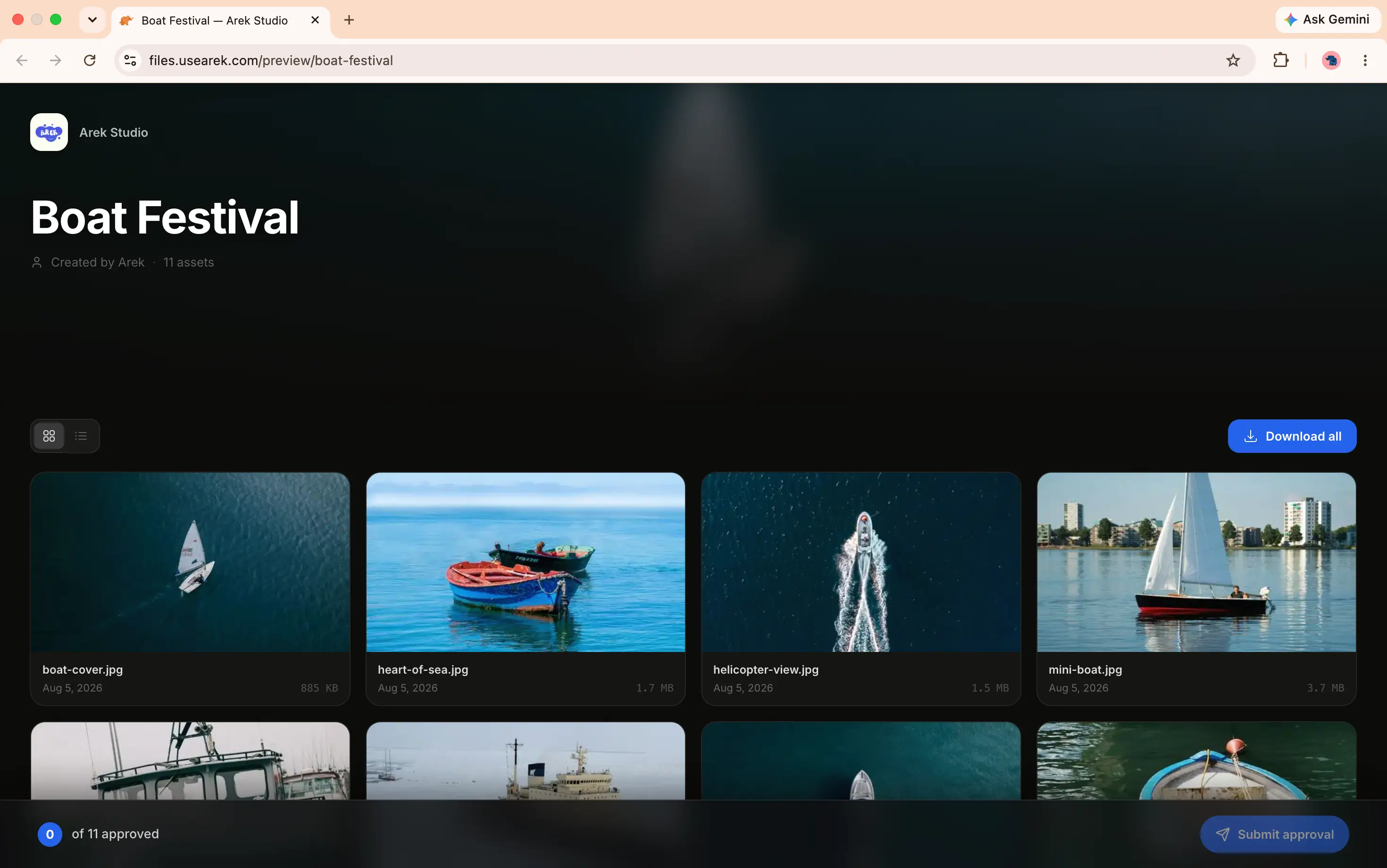
Every file you send or request ends up on a web page. With standard file sharing, that page belongs to the platform: their logo, their colors, their domain, sometimes their ads. With branded file transfer, that page belongs to you.
A fully branded setup includes four things:
Your domain in the address bar. The link reads files.yourbrand.com, not we.tl/abc123 or dropbox.com/transfer/xyz. This is the single feature that separates genuine branding from partial branding, and it is the one most tools do not offer at a standard price.
Your visual identity on the page. Your logo, your brand colors, your business name. No third-party platform name anywhere the client can see, including in the URL, the page header, the footer, or the email notification.
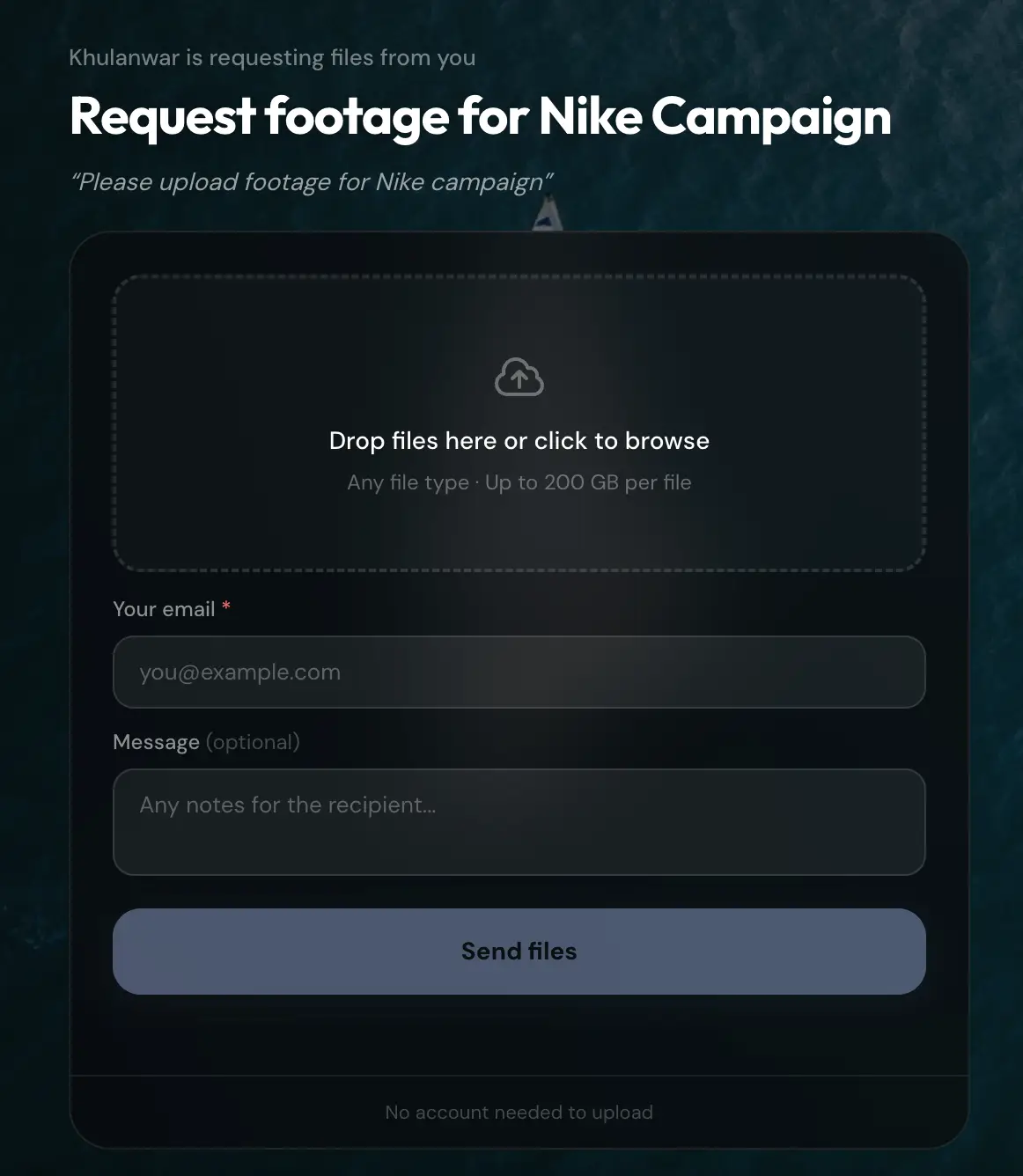
Both directions covered. Not just the files you deliver, but the upload page where clients send files to you. A branded file request page keeps your identity on both halves of the exchange.
A client experience built for the recipient. No account creation, no app download, no ads, no upsells to the platform's own product while your client is trying to use the page.
The reason this matters is simple: the file page is a client touchpoint, exactly like your proposal, your invoice, or your email signature. It is often the last thing a client sees at the end of a project and the first thing they see at the start. Leaving it branded by a third party is the equivalent of sending an invoice on someone else's letterhead.
2. How Branded File Transfer Works Technically
Branded file transfer sounds complex but rests on two standard web technologies you already rely on every day: DNS and TLS.
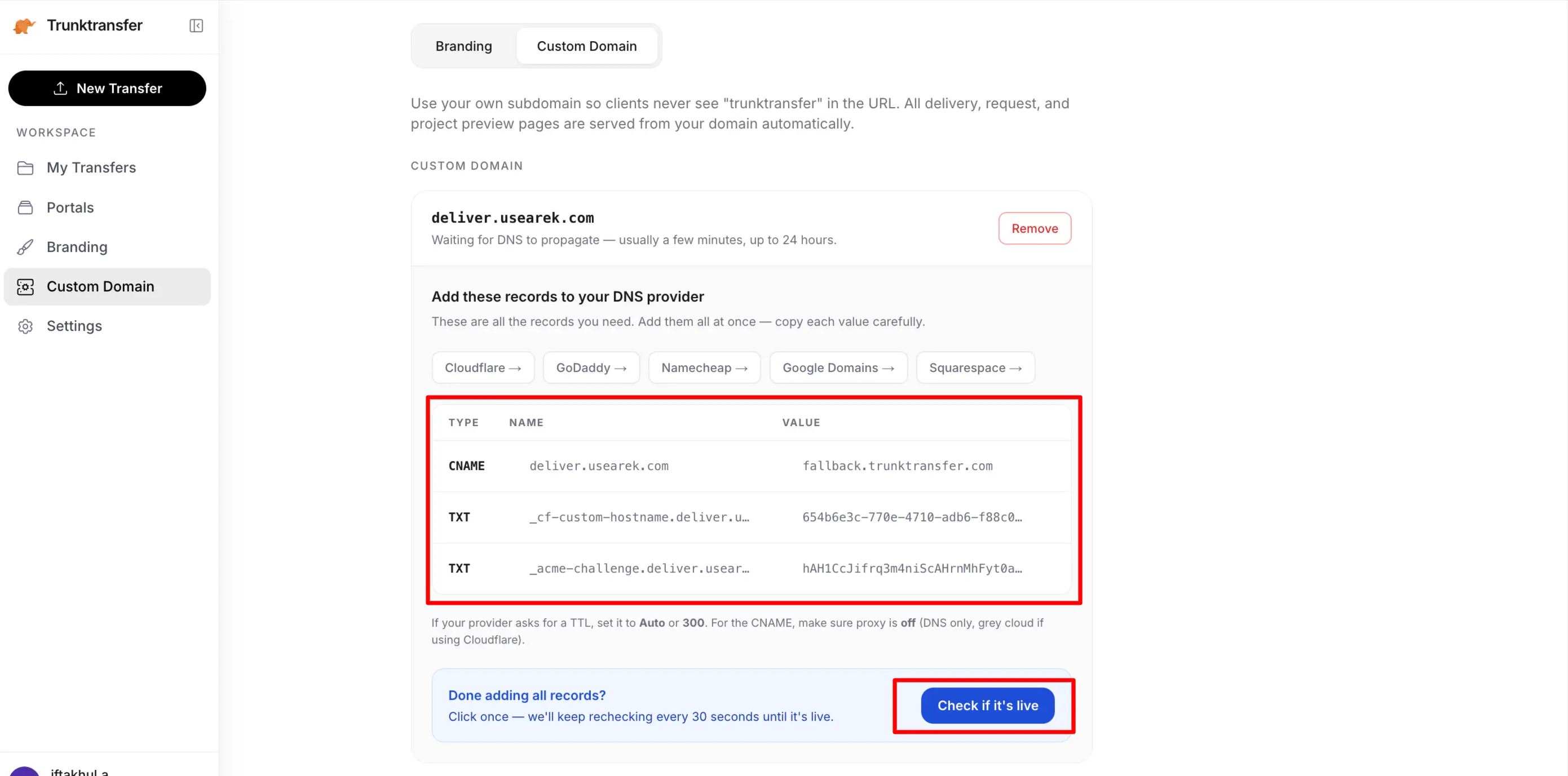
The CNAME record. When you set up a custom domain, you add a single CNAME record at your DNS provider (Cloudflare, GoDaddy, Namecheap, Squarespace, wherever your domain lives). A CNAME is an alias: it tells the internet that files.yourbrand.com should point to the file transfer provider's servers. You are not moving your website or your email; you are pointing one subdomain at the tool. This is why it does not interfere with your main site at www.yourbrand.com.
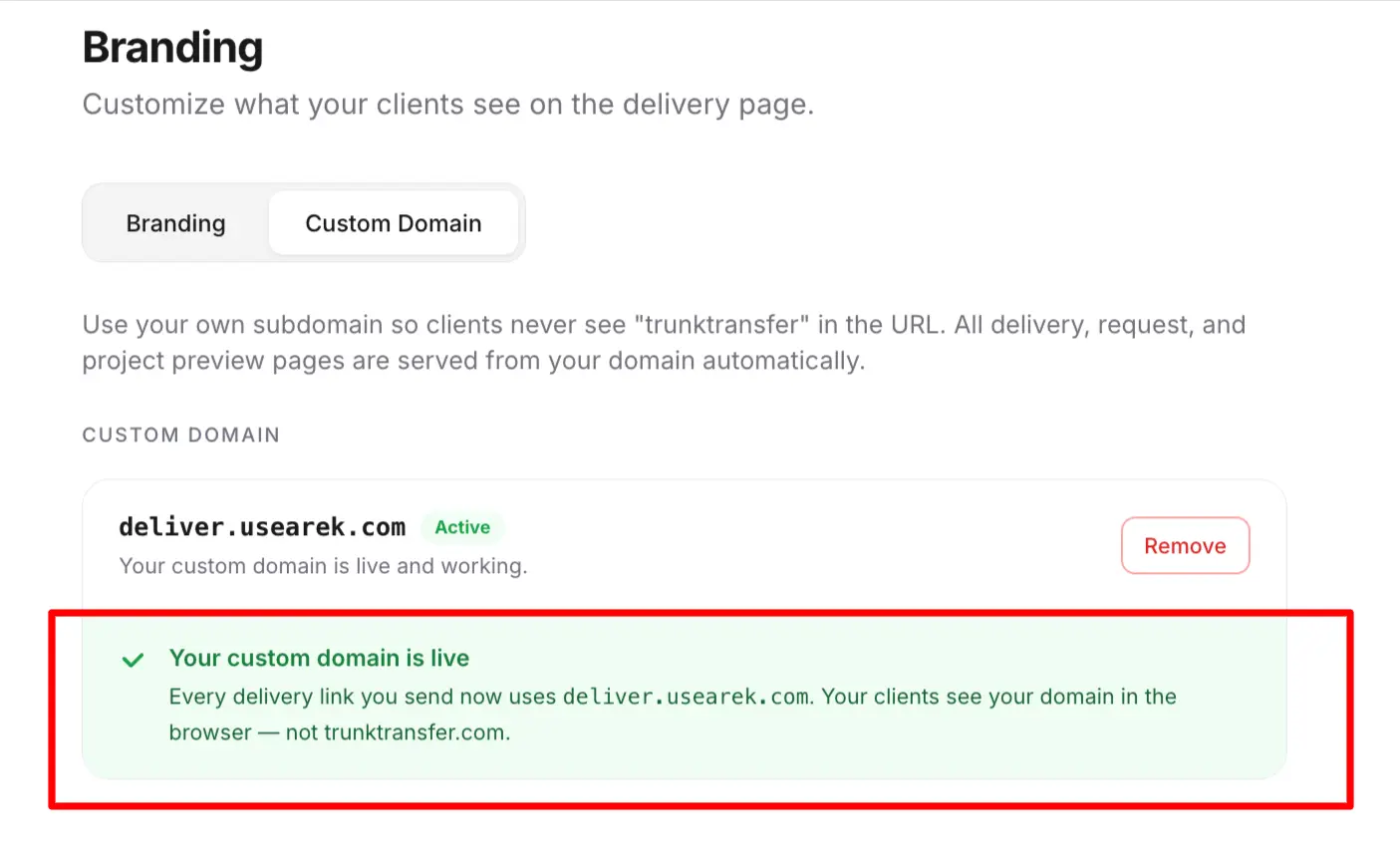
TLS certificate provisioning. For the branded link to load securely with the padlock icon (https://), a TLS certificate has to exist for files.yourbrand.com. Good tools handle this automatically: once your CNAME resolves, they provision and renew the certificate for your subdomain in the background, usually via Let's Encrypt or a similar authority. You never touch a certificate file. Tools that do not automate this force you into manual certificate management, which is a red flag for a small team.
What happens when a client clicks. The client clicks files.yourbrand.com/d/project. Their browser resolves the CNAME to the provider's servers, the provider serves the delivery page over the TLS certificate issued for your subdomain, and the page renders with your logo and colors. From the client's perspective, they never left your brand. From an infrastructure perspective, the provider did all the heavy lifting; you added one DNS record.
Why the subdomain, not the root domain. You use files.yourbrand.com, a subdomain, rather than yourbrand.com itself, because your root domain already points at your website. A subdomain lets file transfer live alongside your site without disruption. files., send., share., and deliver. are all common choices.
The entire technical footprint on your side is one DNS record. Everything else, certificate issuance, renewal, routing, page rendering, is handled by the provider. This is why branded file transfer can be a $9/mo feature rather than an engineering project.
3. Custom Domain vs. Branded Subdomain: The Distinction That Decides Everything
This is where most comparisons mislead, sometimes deliberately. Many tools advertise "custom branding" or even "custom domain" when what they actually offer is a branded subdomain: your name attached to their domain.
True custom domain: files.yourbrand.com. Your domain. Set up via a CNAME record. The vendor's name appears nowhere. This is the real thing.
Branded subdomain: yourbrand.transfernow.net or yourbrand.vendor.com. Your name, their domain. The client still sees the vendor's brand in the address bar. This is branding theater: it looks customized until anyone reads the URL.
The difference is not cosmetic. A client who receives files.yourbrand.com/d/rebrand sees a link that is unmistakably yours. A client who receives yourbrand.somefiletool.com/d/rebrand sees that you use "some file tool," and the illusion of a self-contained brand collapses. For a business where professional reputation is on the line at the moment of handoff, the distinction is the entire point.
When any tool or comparison claims "custom domain," apply one test: does the client's link contain your domain, or the vendor's? If the vendor's name is anywhere in the URL, it is a branded subdomain, not a custom domain, regardless of what the marketing says.
4. The Full Tool Landscape, With Real Prices
Here is where a true custom domain actually sits across the major file transfer tools as of 2026, with the plan and price required. This is the table the rest of the internet gets wrong, because most comparisons mark "custom domain: yes" without noting it costs $499/mo or is actually a subdomain.
| Tool | True custom domain? | Plan required | Price | Notes |
|---|---|---|---|---|
| TrunkTransfer | Yes | Starter | $9/mo | Included at entry tier; client portals and approval too |
| TransferNow | Yes | Enterprise only | Custom pricing | Premium ($10/mo) gives only a branded subdomain |
| Smash | Yes | Enterprise only | Custom pricing | Pro (~€10/mo) has visual branding, not a domain |
| Files.com | Yes | Power and up | From ~$499/mo | Enterprise MFT platform; overkill for most |
| WeTransfer | No | Not on any plan | N/A | Ultimate ($23/mo) brands a we.tl page only |
| Dropbox Transfer | No | Not on any plan | N/A | No branding of any kind |
| Google Drive | No | Not on any plan | N/A | No branding, including Workspace |
| MASV | No | Not on any plan | N/A | Branded upload portals only; download stays on MASV |
| Hightail | No | Not on any plan | N/A | Teams branding is on Hightail's infrastructure |
| SendGB | No | Not on any plan | N/A | Ads on the free download page |
The pattern is stark. Of the major tools, only two offer a true custom domain below enterprise pricing, and only one, TrunkTransfer, includes it at a standard entry-tier price. Everywhere else it is either unavailable, a subdomain in disguise, or a $199 to $499+ per month enterprise line item. This is the gap the phrase "branded file transfer without enterprise pricing" describes.
5. Standard vs. Branded File Transfer
The difference between standard and branded file transfer is who the experience is designed for.
Standard file-sharing tools are built for the sender. They optimize uploading and sending, and the recipient's experience is an afterthought: a generic page, sometimes with ads, sometimes requiring an account, always carrying the platform's identity. The tool's own brand is the point, because every transfer is free marketing for them.
Branded file transfer inverts this. It is built around the recipient, on the premise that the file page is a client touchpoint. A business that sends a project through a page covered in someone else's branding undercuts its own message at the exact moment the client receives the work.
There is also a practical operational difference beyond appearance:
| Standard file sharing | Branded file transfer | |
|---|---|---|
| Domain on the link | Vendor's | Yours |
| Branding on the page | Vendor's | Yours |
| Ads | Sometimes | Never |
| Client account | Sometimes required | Never required |
| Download notifications | Rare | Standard |
| Persistent client space | No | Client portals |
| Who it is designed for | The sender / the vendor | The recipient / your client |
The full comparison, including when standard sharing is genuinely the right choice, is covered in branded file transfer vs regular file transfer.
6. Branded File Transfer Works in Both Directions
Most tools and most articles treat branded file transfer as a one-way concept: the files you deliver. But files travel both ways in every project, and the receive direction is the half almost everyone ignores.
The delivery direction is the finished work going to the client: the final files, the deliverable, the handoff. This is what most people picture.
The collection direction is everything the client sends you: raw footage, brand assets, briefs, reference material, source files. Every project starts here, before you deliver anything.
If your delivery is branded but your collection happens through a generic WeTransfer request link, the first interaction of every project still looks like a free consumer tool. Genuine branded file transfer covers both: a branded upload page where clients send you files on your domain, and a branded delivery page where you send finished work back. The whole exchange, start to finish, stays on your brand.
For repeat clients, a client portal unifies both directions into one persistent, branded space: the client bookmarks a single link on your domain and uses it to both send you material and receive your deliveries for the life of the relationship.
7. What Features to Look For: A Buyer's Checklist
Beyond the custom domain, these features determine whether a branded file transfer tool works for professional client work. Use this as a checklist when evaluating any tool:
A true custom domain, not a subdomain. The single most important check. Confirm the client's link contains your domain, not the vendor's.
Custom domain at a standard price. Verify it is not gated behind a $199 to $499+ enterprise plan. This is where most tools fail.
No client signup, ever. If your client must create an account to download or upload, the friction lands on the person you least want to inconvenience.
Both send and receive. The tool should brand the upload page too, not just the download page.
Client portals. One persistent URL per client, collecting every transfer, so the client never emails you for a resent link.
Download notifications. Know when the client actually received the files, ending the "did you get it?" email.
Automatic TLS. Certificate provisioning and renewal should be handled for you, not manual.
Password protection and link expiry. Standard for anything unreleased or confidential.
Adequate file size limits. For creative and media work, 200GB per transfer covers almost everything short of raw video production.
A clean sign-off mechanism. The ability for a client to approve a delivery or leave a comment, ideally without an account, closes the loop without a separate email thread.
A tool that passes the first two checks (true custom domain, standard price) is already rare. A tool that passes all of them is the exception.
8. Common Mistakes When Choosing a Tool
Trusting "custom domain: yes" in a comparison table. As Section 4 showed, "yes" often means a subdomain, or a $499/mo enterprise tier. Always verify the plan and the actual URL.
Confusing visual branding with a custom domain. A logo on the vendor's page is not the same as your domain. WeTransfer Ultimate, Smash Pro, and TransferNow Premium all add logos and colors while keeping their own domain in the URL.
Branding delivery but not collection. Setting up a beautiful branded delivery page, then sending clients a raw WeTransfer request link to gather files, leaves half the exchange unbranded.
Overbuying into an enterprise MFT platform. Tools like Files.com genuinely offer custom domains, but they are enterprise managed-file-transfer platforms priced from ~$499/mo, built for SFTP automation and compliance, not for a small team that just wants branded client handoffs.
Ignoring the client's friction. A tool that requires the client to create an account defeats the purpose. The branded page should load and download with one click.
Forgetting renewal. If a tool requires manual TLS certificate management, your branded link will eventually break when the certificate expires. Automatic provisioning is not a luxury; it is a requirement.
9. What Branded File Transfer Costs
The market splits into three clear price bands:
Partial branding on the vendor's domain ($8 to 25 per month). WeTransfer Ultimate ($23/mo) and TransferNow Premium ($10/mo) add logos and colors, but on the vendor's own domain. You get a nicer page, not your page. Smash Pro (~€10/mo) is similar.
A true custom domain at a standard price ($9/mo). As of 2026, TrunkTransfer's Starter plan is the standard-priced plan that includes a true custom domain, white-label pages, client portals, and file approval, with a 7-day trial.
Enterprise custom pricing ($199 to $499+ per month). Files.com, and the Enterprise tiers of TransferNow and Smash, offer true custom domains, typically bundled with SSO, admin controls, and automation aimed at larger organizations.
For a small business, genuinely branded file transfer costs about the same as one lunch per month. The expensive version of this feature is an enterprise sales call; the affordable version is a $9/mo plan. The reason the price range is so wide is not the underlying technology, which is one DNS record and an automated certificate, but how each vendor chooses to package it.
10. How to Set It Up
The setup is simpler than the price range suggests. With TrunkTransfer as the example:
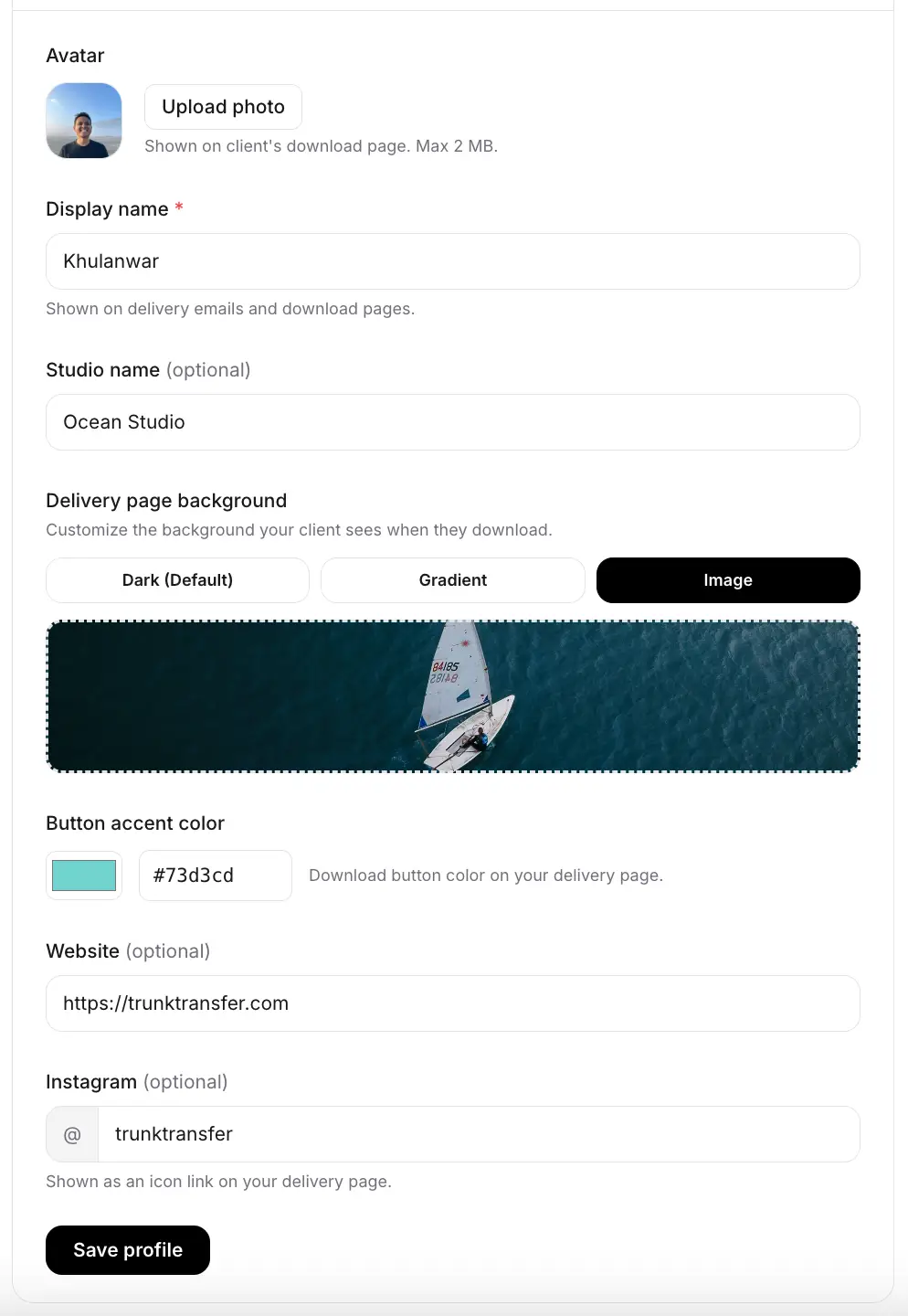
- Sign up and add your brand. Your business name and logo appear on every page.
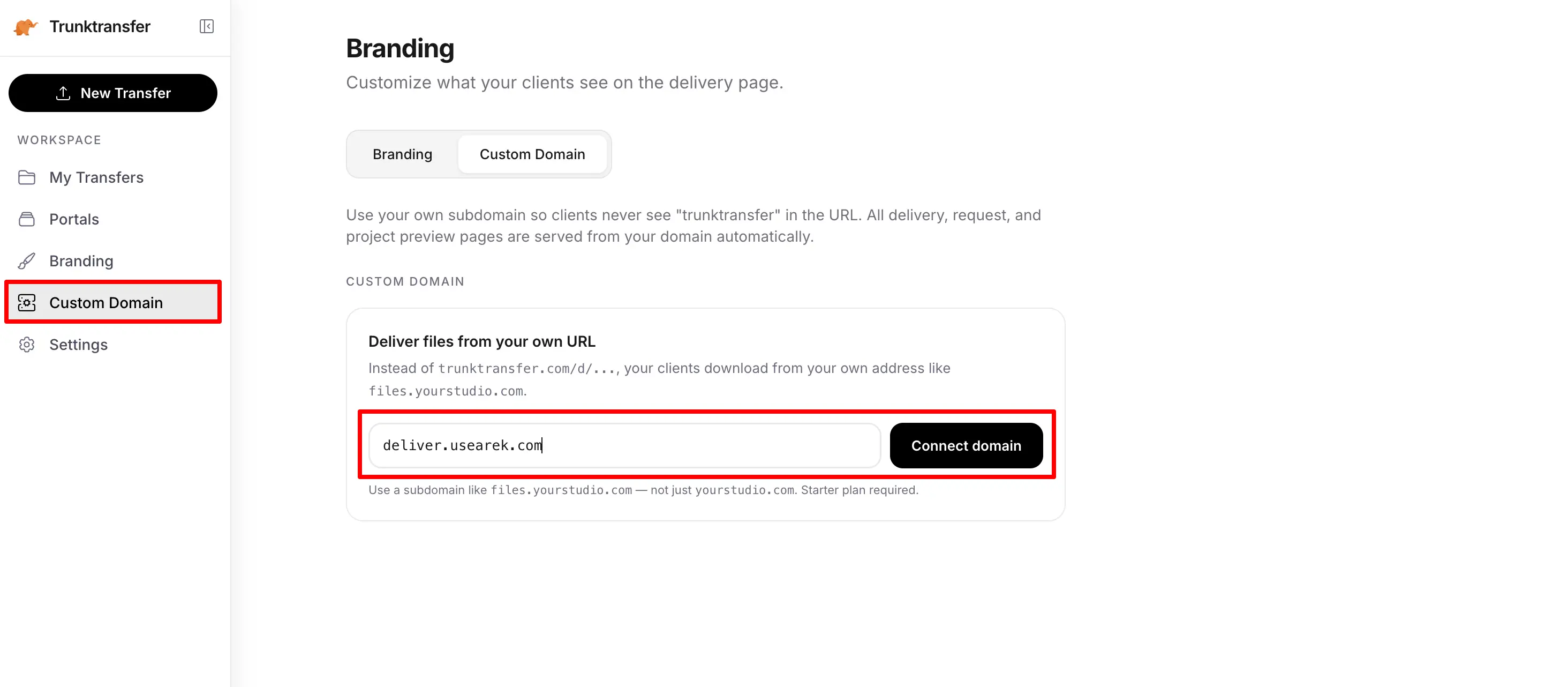
- Add your custom domain. Choose a subdomain of your own site, like
files.yourbrand.com, and add one CNAME record at your DNS provider. This takes about five minutes and the setup guide walks you through it per provider.
- Wait for DNS and TLS. DNS propagation takes anywhere from a few minutes to an hour; the TLS certificate provisions automatically once your CNAME resolves.
- Set your brand colors. Logo, avatar, and colors apply across delivery pages, upload pages, and client portals.
- Send or request your first files. Files go out, or come in, on your own domain, with your branding, no client account required.
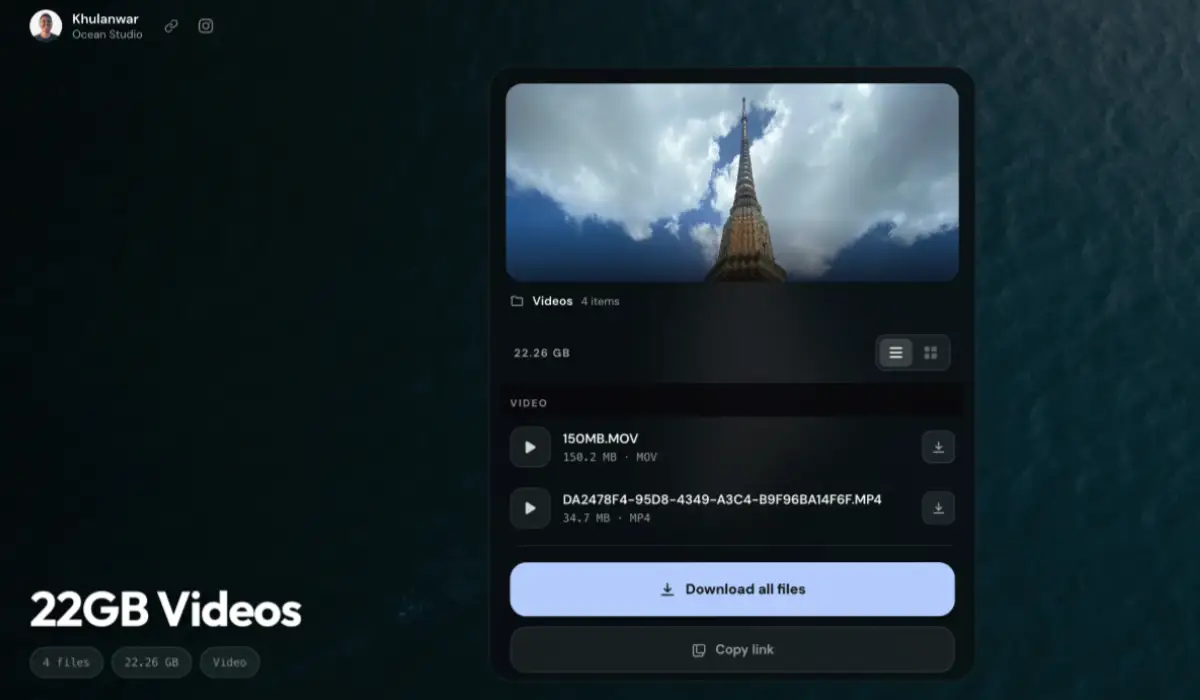
Total hands-on time: about 10 minutes, most of it waiting for DNS to propagate.
Frequently Asked Questions
What is branded file transfer?
Branded file transfer means sending and receiving files through pages that carry your own domain, logo, and colors instead of a third-party platform's branding. The client clicks a link like files.yourbrand.com and lands on a page that looks like your business, with no vendor name visible anywhere, including the URL.
What is the difference between branded and regular file transfer?
Regular file sharing (WeTransfer, Dropbox, Google Drive) delivers files through the platform's own pages, with their branding. Branded file transfer puts the entire experience on your domain with your identity. Regular sharing is built for the sender's convenience and the vendor's marketing; branded transfer is built for the client's experience of receiving the work.
What is the difference between a custom domain and a branded subdomain?
A true custom domain is your own URL, like files.yourbrand.com, set up via a CNAME record, with the vendor's name nowhere in it. A branded subdomain is your name on the vendor's domain, like yourbrand.vendor.com, where the client still sees the vendor. Only the first is genuine branded file transfer. Many tools advertise the second as if it were the first.
How does branded file transfer work technically?
You add one CNAME record at your DNS provider pointing a subdomain (like files.yourbrand.com) at the file transfer tool. The tool automatically provisions a TLS certificate for that subdomain so the link loads securely. When a client clicks the link, the tool serves your branded page over your domain. The only work on your side is adding one DNS record.
Do I need technical skills to set up branded file transfer?
No. The only technical step is adding a single CNAME record, which most DNS providers make a copy-paste operation, and good tools provide step-by-step instructions per provider. Certificate provisioning and renewal are automatic. Total setup is about 10 minutes.
How much does branded file transfer cost?
Partial branding on a vendor's domain runs $8 to 25 per month. A true custom domain at a standard price is $9/mo on TrunkTransfer's Starter plan. On most other tools, a true custom domain requires a custom-priced enterprise plan, often $199 to $499+ per month.
Can I brand the page where clients upload files to me, not just downloads?
Yes, with the right tool. TrunkTransfer's file request pages carry your domain and branding, so files clients send you look as professional as files you send them. Most tools brand only the download side.
Which file transfer tools offer a true custom domain?
As of 2026: TrunkTransfer (from $9/mo), TransferNow and Smash (Enterprise only, custom pricing), and Files.com (from ~$499/mo). WeTransfer, Dropbox Transfer, Google Drive, MASV, Hightail, and SendGB do not offer a true custom domain on any plan.
Does branded file transfer affect my website or email?
No. You point a subdomain (like files.yourbrand.com) at the tool via a CNAME record. Your main website at www.yourbrand.com and your email are untouched, because they use different DNS records.
The Bottom Line
Branded file transfer is one of the highest-visibility, lowest-cost upgrades available to a business. The client-facing moment it improves happens on every project, in both directions, and the genuine version costs $9/mo despite most of the market packaging it as an enterprise feature.
The one thing to verify before choosing any tool: whether "custom domain" means files.yourbrand.com or yourbrand.theirplatform.com. That single distinction separates the tools built for your brand from the tools renting you a corner of theirs.


